
In the last part we created a simple app to use the OAuth authorization strategy, now we will continue, and finish our app.
Setting up GitHub
Firstly we need to create an OAuth app at our GitHub account, you can do this by going, Settings > Developer settings > OAtuh apps > New OAuth App, you will see something like this:
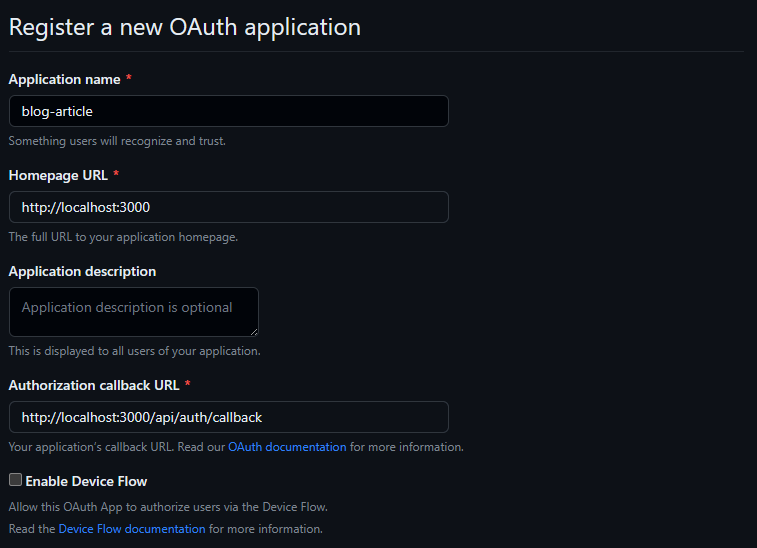
You can fill like the image, but adapt to your application, and you need to change it later when you deploy.
After that you need to save to environment variables, the client id and the client secret, take a look:

Copy the client id then generate a new client secret and copy it too, save it to your environment variables.
NEXT_PUBLIC_GITHUB_CLIENT_ID = "client id"
GITHUB_CLIENT_SECRET = "client secret"
NEXT_PUBLIC_GITHUB_CLIENT_ID = "client id"
GITHUB_CLIENT_SECRET = "client secret"The client id will be used both in client side and server side that's why is public, in the other hand, our client secret will be only used in server side, so it doesn't need to be public.
Authorization flow
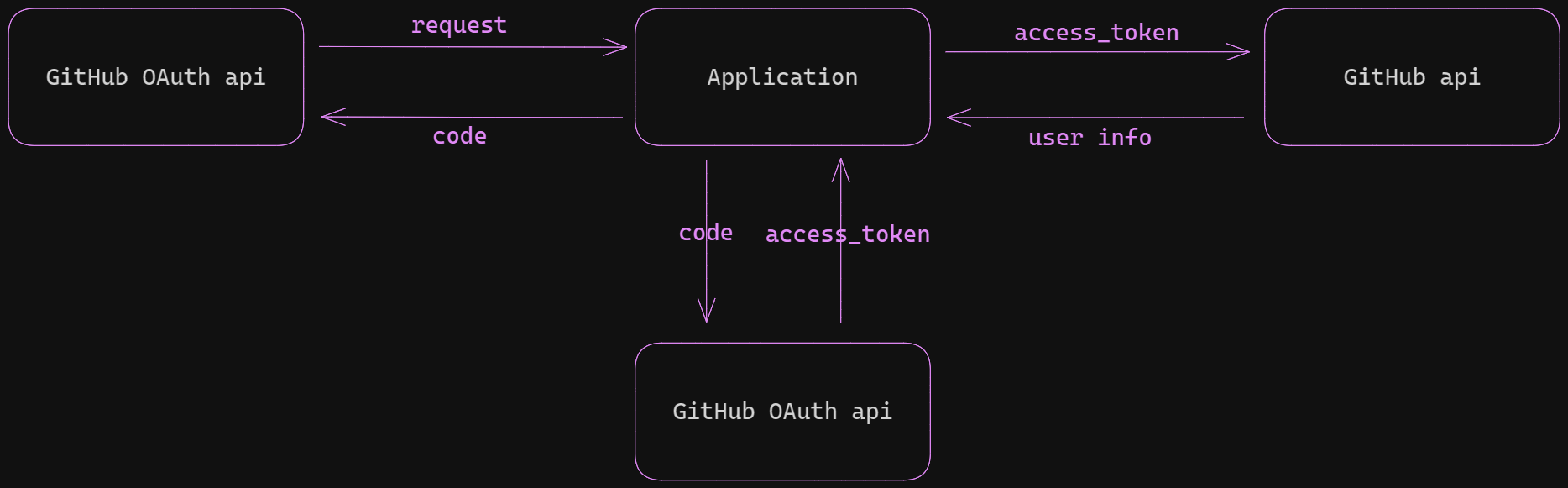
The authorization flow will look like this:
- Our app makes a request, GitHub redirects to the URL callback with the code as a URL parameter.
- Then we exchange this code for an access_token passing the code as an URL parameter.
- Finally we use the access_token as an header Authorization parameter to get user information on their behalf.
Let's code this.
1. Get the code
In our SignIn component, we will change the anchor's href to the following URL, passing the client id as a parameter.
export function SignIn() {
  return (
    <div>
      <a
        // ...
        href={`https://github.com/login/oauth/authorize?client_id=${process.env.NEXT_PUBLIC_GITHUB_CLIENT_ID}`}
      >
      </a>
    </div>
  )
}
export function SignIn() {
return (
<div>
<a
// ...
href={`https://github.com/login/oauth/authorize?client_id=${process.env.NEXT_PUBLIC_GITHUB_CLIENT_ID}`}
>
</a>
</div>
)
}We will be redirect to the callback URL we set, it will be an api route in our application, to reach this in Next create a file following the structure above.
app
└── api
    └── auth
        └── callback
            └── route.ts
app
└── api
└── auth
└── callback
└── route.tsInside the file we can get the code from the URL params.
import { NextRequest } from 'next/server'

export async function GET(request: NextRequest) {
  // get code
  const { searchParams } = new URL(request.url)

  const code = searchParams.get('code')
}
import { NextRequest } from 'next/server'
export async function GET(request: NextRequest) {
// get code
const { searchParams } = new URL(request.url)
const code = searchParams.get('code')
}2. Get the access token
Now we need to exchange the code we got for an access token, that will allow us to get user information. To do this we need to make a POST request passing the code, the client id, and client secret as URL params.
import axios from 'axios'
import { NextRequest } from 'next/server'

export async function GET(request: NextRequest) {
  // ...

  const accessTokenResponse = await axios.post(
    'https://github.com/login/oauth/access_token',
    null,
    {
      params: {
        code,
        client_id: process.env.NEXT_PUBLIC_GITHUB_CLIENT_ID,
        client_secret: process.env.GITHUB_CLIENT_SECRET,
      },
      headers: {
        Accept: 'application/json',
      },
    },
  )

  const { access_token } = accessTokenResponse.data
}
import axios from 'axios'
import { NextRequest } from 'next/server'
export async function GET(request: NextRequest) {
// ...
const accessTokenResponse = await axios.post(
'https://github.com/login/oauth/access_token',
null,
{
params: {
code,
client_id: process.env.NEXT_PUBLIC_GITHUB_CLIENT_ID,
client_secret: process.env.GITHUB_CLIENT_SECRET,
},
headers: {
Accept: 'application/json',
},
},
)
const { access_token } = accessTokenResponse.data
}Notice that we pass this header Accept option, so we can recieve the response in JSON.
3. Handle user information
Now with the access token, we can make a request to the GitHub api on behalf of the user, to get the info we need. After that we will save this data into a jwt.
import axios from 'axios'
import { NextRequest } from 'next/server'

export async function GET(request: NextRequest) {
  // ...

  const userResponse = await axios.get('https://api.github.com/user', {
    headers: {
      Authorization: `Bearer ${access_token}`,
    },
  })

  const userInfo = userResponse.data

  // handle user info

  const token = jwt.sign(
    {
      name: userInfo.name,
      avatarUrl: userInfo.avatar_url,
    },
    'shhhhh', // change this to a more secure secret
    {
      expiresIn: '30 days',
    },
  )
}
import axios from 'axios'
import { NextRequest } from 'next/server'
export async function GET(request: NextRequest) {
// ...
const userResponse = await axios.get('https://api.github.com/user', {
headers: {
Authorization: `Bearer ${access_token}`,
},
})
const userInfo = userResponse.data
// handle user info
const token = jwt.sign(
{
name: userInfo.name,
avatarUrl: userInfo.avatar_url,
},
'shhhhh', // change this to a more secure secret
{
expiresIn: '30 days',
},
)
}With everything done, we can redirect the user back to our home page, and save the jwt as a cookie, so we can get their information later.
import axios from 'axios'
import { NextRequest } from 'next/server'

export async function GET(request: NextRequest) {
  // ...

  const tokenExpiresInSeconds = 60 * 60 * 24 * 30
  const redirectUrl = new URL('/', request.url)

  return NextResponse.redirect(redirectUrl, {
    headers: {
      'Set-Cookie': `token=${token}; Path=/; max-age=${tokenExpiresInSeconds}`,
    },
  })
}
import axios from 'axios'
import { NextRequest } from 'next/server'
export async function GET(request: NextRequest) {
// ...
const tokenExpiresInSeconds = 60 * 60 * 24 * 30
const redirectUrl = new URL('/', request.url)
return NextResponse.redirect(redirectUrl, {
headers: {
'Set-Cookie': `token=${token}; Path=/; max-age=${tokenExpiresInSeconds}`,
},
})
}The Set-Cookie header will set a token, available in all of our app with the same max-age our token has.
Using our user data
Our user is authorized and inside the token we have its information, now let's use it.
Firstly, we will render the Profile component, checking if we have a token inside our cookies.
import { Profile } from '@/components/Profile'
import { SignIn } from '@/components/Signin'
import { cookies } from 'next/headers'

export default function Home() {
  const isAuthenticated = cookies().has('token')

  return (
    <div className="min-h-screen flex items-center justify-center">
      {isAuthenticated ? <Profile /> : <SignIn />}
    </div>
  )
}
import { Profile } from '@/components/Profile'
import { SignIn } from '@/components/Signin'
import { cookies } from 'next/headers'
export default function Home() {
const isAuthenticated = cookies().has('token')
return (
<div className="min-h-screen flex items-center justify-center">
{isAuthenticated ? <Profile /> : <SignIn />}
</div>
)
}Create a folder called lib inside our src directory, inside that folder we will put files that can be helpful for our application. We will create the auth.ts lib.
import jwt from 'jsonwebtoken'
import { cookies } from 'next/headers'

interface User {
  name: string
  avatarUrl: string
}

export function getUser() {
  const token = cookies().get('token')?.value

  if (!token) {
    throw new Error('Unauthenticated')
  }

  const user = jwt.verify(token, 'shhhhh')
  // handle if the token is invalid

  return user as User
}
import jwt from 'jsonwebtoken'
import { cookies } from 'next/headers'
interface User {
name: string
avatarUrl: string
}
export function getUser() {
const token = cookies().get('token')?.value
if (!token) {
throw new Error('Unauthenticated')
}
const user = jwt.verify(token, 'shhhhh')
// handle if the token is invalid
return user as User
}Going to our Profile component. let's render the user information.
import { getUser } from '@/app/lib/auth'
import Image from 'next/image'

export function Profile() {
  const user = getUser()

  return (
    <div className="flex gap-2 items-center bg-zinc-700 p-2 rounded w-60">
      <Image
        src={user.avatarUrl}
        width={60}
        height={60}
        alt={user.name}
        className="rounded"
      />
      <p>
        {user.name}
        <a
          className="block text-red-400 transition-colors hover:text-red-500"
          href="#"
        >
          Log out
        </a>
      </p>
    </div>
  )
}
import { getUser } from '@/app/lib/auth'
import Image from 'next/image'
export function Profile() {
const user = getUser()
return (
<div className="flex gap-2 items-center bg-zinc-700 p-2 rounded w-60">
<Image
src={user.avatarUrl}
width={60}
height={60}
alt={user.name}
className="rounded"
/>
<p>
{user.name}
<a
className="block text-red-400 transition-colors hover:text-red-500"
href="#"
>
Log out
</a>
</p>
</div>
)
}Logout route
Lastly we need to make possible for the user to log out, we just need to remove the token cookie, and we can make this using another api route. Follow the structure above
app
└── api
    └── auth
        ├── callback
        │   └── route.ts
        └── logout
            └── route.ts
app
└── api
└── auth
├── callback
│ └── route.ts
└── logout
└── route.tsInside the file we can remove the cookie with the Set-Cookie header option.
import { NextRequest, NextResponse } from 'next/server'

export async function GET(request: NextRequest) {
  const redirectURL = new URL('/', request.url)

  return NextResponse.redirect(redirectURL, {
    headers: {
      'Set-Cookie': `token=; Path=/; max-age=0;`,
    },
  })
}
import { NextRequest, NextResponse } from 'next/server'
export async function GET(request: NextRequest) {
const redirectURL = new URL('/', request.url)
return NextResponse.redirect(redirectURL, {
headers: {
'Set-Cookie': `token=; Path=/; max-age=0;`,
},
})
}In our Profile component, we redirect the user to this route using the anchor.
export function Profile() {
  // ...
  return (
    <div className="flex gap-2 items-center bg-zinc-700 p-2 rounded w-60">
      ...
        <a
          className="block text-red-400 transition-colors hover:text-red-500"
          href="/api/auth/logout"
        >
          Log out
        </a>
      ...
    </div>
  )
}
export function Profile() {
// ...
return (
<div className="flex gap-2 items-center bg-zinc-700 p-2 rounded w-60">
...
<a
className="block text-red-400 transition-colors hover:text-red-500"
href="/api/auth/logout"
>
Log out
</a>
...
</div>
)
}Aaaand we're done.
Conclusion
This is a tutorial using the GitHub OAuth strategy, but this apply to most of the services we have. I hope you found it helpful, sign in With Google, Facebook and GitHub is a simply way to allow users to sign in to their account without having to fill additional login details. If you have any trouble you can check the source code in this repo, and the GitHub Docs. Happy coding bye bye 👋.